Surface 2 review: a great battery and screen
mirror
Surface 2 review: Microsoft makes progress but can't escape Windows RT
Microsoft's latest attempt to make a Windows RT tablet relevant is an improvement in almost every way
The Microsoft Surface 2 is the companys second iteration of its Windows RT tablet computer, which improves on its predecessor in almost every way.
It is a 10.6in tablet with a sharp high-definition screen packed with Microsofts Windows 8-style modern user interface and comes equipped with a full Microsoft Office suite when work calls.
Design
The Microsoft Surface 2 continues the very strong and solid, almost industrial build quality that defined the original Surface tablet. There is no flex in the body, and the strong frame feels like you could use it as an offensive weapon, if a mugger came a knocking.
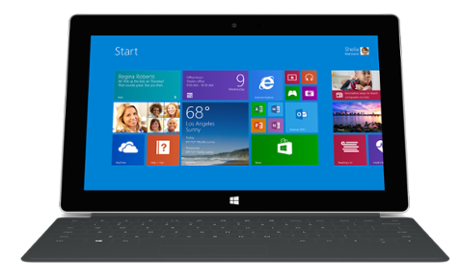
That solid, reassuring build means it is relatively heavy for a tablet; slightly heavier than the 652g iPad 4 at 676g. The 16:9 formfactor, however, makes it easier to hold in portrait one-handed due to the Surface having a smaller moment pulling the tablet out of your hand.
Unlike the original Surface, and the Surface Pro line of full Windows 8 tablets, the Surface 2 is only available in silver, which is apparently the naked colour of the magnesium used to construct the tablets frame.
The Surface 2 is pretty thin for a 10in tablet, and is 0.5mm thinner than the iPad 4 at 8.9mm thick, meaning the Surface 2 will easily slip into most briefcases, messenger bags or backpacks.
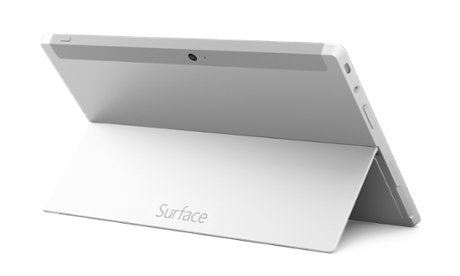
The back of the Surface 2 sports a kickstand, which supports two angles making using it on a desk or your lap a lot easier than the original Surface.
Stereo speakers are fitted in the left and right-hand sides of the tablet, which are loud and clear for a tablet, making watching TV or movies satisfying, even if they arent truly room filling.
The 10.6in screen is the biggest visible change from the first generation Surface. It is bright, clear and crisp thanks to its higher, 1920 x 1200 resolution.
While on paper the screen is beaten by the iPad 4s 9.7in 2048 x 1536 resolution retina display, photos look colourful and detailed while text appears pin sharp and easily legible on websites and ebooks a trademark of Microsofts ClearType technology, which produces clear text even on relatively low-resolution screens and makes the text on the Surface 2 really shine.
The screen also has good viewing angles making sharing video with others easy, while decent blacks and colour range make said video look great.
Microsoft's latest attempt to make a Windows RT tablet relevant is an improvement in almost every way
The Microsoft Surface 2 is the companys second iteration of its Windows RT tablet computer, which improves on its predecessor in almost every way.
It is a 10.6in tablet with a sharp high-definition screen packed with Microsofts Windows 8-style modern user interface and comes equipped with a full Microsoft Office suite when work calls.
Design
The Microsoft Surface 2 continues the very strong and solid, almost industrial build quality that defined the original Surface tablet. There is no flex in the body, and the strong frame feels like you could use it as an offensive weapon, if a mugger came a knocking.
That solid, reassuring build means it is relatively heavy for a tablet; slightly heavier than the 652g iPad 4 at 676g. The 16:9 formfactor, however, makes it easier to hold in portrait one-handed due to the Surface having a smaller moment pulling the tablet out of your hand.
Unlike the original Surface, and the Surface Pro line of full Windows 8 tablets, the Surface 2 is only available in silver, which is apparently the naked colour of the magnesium used to construct the tablets frame.
The Surface 2 is pretty thin for a 10in tablet, and is 0.5mm thinner than the iPad 4 at 8.9mm thick, meaning the Surface 2 will easily slip into most briefcases, messenger bags or backpacks.
The back of the Surface 2 sports a kickstand, which supports two angles making using it on a desk or your lap a lot easier than the original Surface.
Stereo speakers are fitted in the left and right-hand sides of the tablet, which are loud and clear for a tablet, making watching TV or movies satisfying, even if they arent truly room filling.
The 10.6in screen is the biggest visible change from the first generation Surface. It is bright, clear and crisp thanks to its higher, 1920 x 1200 resolution.
While on paper the screen is beaten by the iPad 4s 9.7in 2048 x 1536 resolution retina display, photos look colourful and detailed while text appears pin sharp and easily legible on websites and ebooks a trademark of Microsofts ClearType technology, which produces clear text even on relatively low-resolution screens and makes the text on the Surface 2 really shine.
The screen also has good viewing angles making sharing video with others easy, while decent blacks and colour range make said video look great.